

How to Move a Home Office Without Losing Work Time
Learning how to move a home office is not just a packing job. It is a continuity plan for your workday, your equipment, your documents, and the first hour after you arrive at the new place. Quick Answer: Inventory every device and piece of furniture, separate what you need for the first workday, label cables before disconnecting them, schedule internet and utilities early, and choose the moving help that fits the actual workload. For a residential move in Cary or elsewhere in the Triangle, the goal is to make one usable workstation available as soon as practical without treating the job like a commercial office relocation.
How to move a home office with a work-continuity plan
A regular household move asks, “What needs to get from one address to the other?” A home-office move adds, “What needs to be ready for work first?” That difference matters for remote employees, freelancers, hybrid workers, students with a study setup, and families managing work equipment alongside the rest of the house.
Start by deciding what “working again” means. For some people, it is a laptop, charger, phone, headset, and reliable internet. For others, it means a desktop tower, two monitors, a docking station, a printer, client files, a standing desk, task lighting, and a quiet corner. Your answer shapes the packing order, the truck-loading conversation, and the first boxes that get opened.
This guide focuses on residential moves in Cary and the Triangle, not corporate office relocation. Ken’s Pack & Move can help with residential local moves, full or partial packing, furniture disassembly and reassembly, and labor-only loading or unloading, but the customer should still handle employer-specific security steps, data backups, account access, and technical setup with the right IT support.
Build a complete inventory before home office packing
Good home office packing begins with a written inventory. Walk the room slowly and list what is on the desk, under the desk, on shelves, in drawers, inside filing cabinets, and plugged into the wall. The inventory does not need to be fancy. A phone note, spreadsheet, or printed worksheet is enough if it captures the items that drive packing, access, and quote details.
Include computers, laptops, monitors, monitor stands, docking stations, keyboards, mice, webcams, microphones, speakers, headsets, printers, scanners, label makers, shredders, routers, modems, mesh units, switches, adapters, surge protectors, power strips, external drives, and removable media. Then add the furniture: desk, office chair, bookcases, shelving, filing cabinets, whiteboards, lamps, floor mats, and storage cubes.
A home office packing pass should also note what is fragile, heavy, high-value, employer-owned, or personally controlled. That does not mean putting confidential details on a box. It means giving yourself and the mover enough information to plan packing, placement, and access without exposing passwords, client names, or private records.
Photograph the current setup before anything comes apart. Take wide photos of the room, close photos of the back of the computer or docking station, and clear photos of monitor-arm positions or shelf arrangements. If you have serial numbers, employer asset tags, or equipment IDs, record them for your own records. Do not put sensitive passwords or confidential data on a box label.
Mark anything that should travel personally rather than in the moving truck. For many people, that includes the main laptop, chargers, external drives, authentication keys, medications, financial documents, work badges, small valuables, and confidential papers. Home office packing works best when the first pass is about control, not boxes.
Inventory details that help the moving quote
A complete office inventory also helps a mover understand the scope. A desk with detachable legs is different from a large built-in-style workstation. A lightweight bookcase is different from a loaded filing cabinet. A small printer is different from a bulky office machine that may require extra care and a clear path.
For an in-state household-goods move in North Carolina, the North Carolina Utilities Commission’s Moving 101 guidance, updated 2026, says, “If you request it, a mover is required to give you a free written estimate on a Commission-approved form”; it also notes that most movers will not provide a written estimate unless they see the items to be moved. The same guidance explains that a written estimate is not required when the request is made fewer than five business days before the move or when the shipment weighs less than 500 pounds. That is a good reason to share an accurate inventory, access notes, and photos instead of guessing.
Ken’s Pack & Move is certificated by the North Carolina Utilities Commission for household-goods moves within North Carolina under certificate C-2551, and the company appears on the NCUC list of certificated household-goods carriers. For your own move, ask for the estimate, valuation choice, date, crew, scope, and price in writing before moving day. Confirm valuation choices in writing before move day rather than assuming what is included.
Separate carry-with-you, first-day, and later boxes
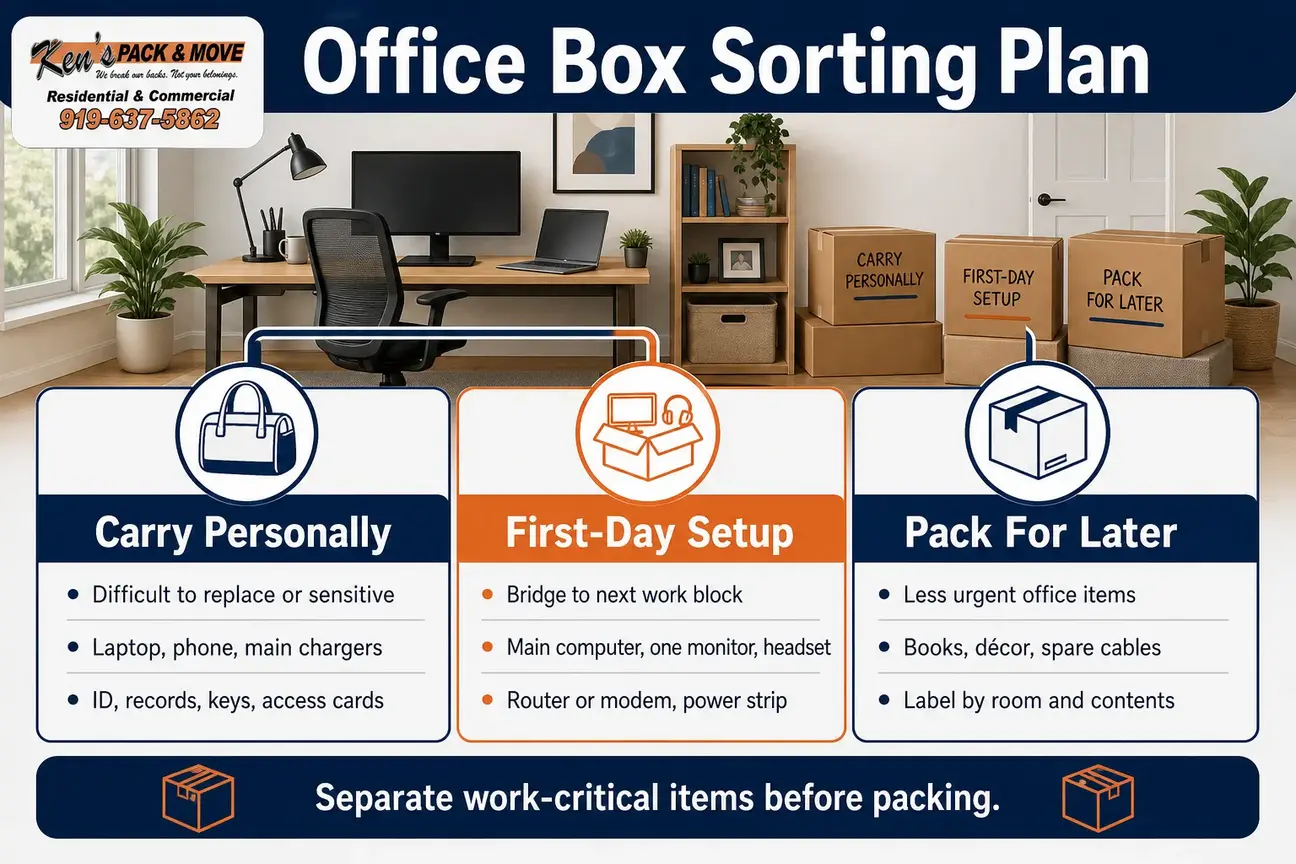
The simplest way to keep work interruption shorter is to divide the office before you pack it. Use three groups: carry personally, first-day setup, and pack for later. This keeps one critical charger or adapter from disappearing into a general “office stuff” carton.
Carry personally
Carry the items that are difficult to replace, sensitive, or immediately necessary. This can include identification, financial records, employment documents, client records, medications, laptop, phone, main chargers, authentication devices, small valuables, sensitive removable media, keys, access cards, and password tools. If a document or device should remain under your direct control, do not bury it in a household box.
First-day setup
The first-day setup group is the bridge between move day and your next work block. For many remote workers, it should include a laptop or main computer, one monitor, keyboard, mouse, headset, webcam if needed, docking station or adapter, power strip, router or modem equipment, a few office supplies, and the paperwork or access devices you need right away.
This is where home office packing becomes a time-saver. Put the first-day group in clearly marked containers and keep them separate from decorative items, spare cables, extra monitors, archived files, and backup peripherals. If you use professional packing help, explain which items belong in this first-day group before the crew starts boxing the room.
Pack for later
Pack less urgent items after the first-day group is secure. That may include reference books, décor, spare keyboards, extra cables, old peripherals, archived files, guest-office supplies, and items that will not affect the first workday. Label these boxes by destination room and general contents, not by confidential details.
Moving computer equipment without creating a cable hunt
Moving computer equipment is easier when you slow down before unplugging. Shut down computers fully, remove discs or loose media, eject external drives properly according to your device instructions, and disconnect cables by holding the connector rather than pulling the cord. If your employer or IT provider has backup or security procedures, follow those separately before move day.
Use original packaging when you still have it and it is in usable condition. If not, choose sturdy, appropriately sized boxes with cushioning that limits movement. Keep monitors upright when practical, protect screens from pressure, and avoid loading heavy items on top of monitors, printers, towers, or scanners. Keep electronics away from moisture, direct sun, and unnecessary heat while staging and unloading.
Moving computer equipment also means thinking about batteries. PHMSA’s lithium-battery guidance, updated 2026, states that lithium batteries must conform to applicable Hazardous Materials Regulations when offered for transportation or transported by air, highway, rail, or water. Inspect laptops, battery backups, loose rechargeable batteries, and other battery-powered items for swelling, leakage, damage, or recall concerns, and ask the mover about restricted items before placing anything on the truck.
Do not pack damaged batteries casually with household goods. PHMSA also says private individuals should use appropriate recycling channels for household lithium batteries and should not place them in trash or general recycling. If you are discarding old electronics or batteries before the move, check the appropriate disposal or recycling route instead of tossing them into a random box.
Label every cable before moving computer equipment
The cable system is where many home offices lose time. Label both ends of each cable before disconnecting it. Use plain labels such as “monitor 1,” “monitor 2,” “dock,” “printer,” “router,” “left speaker,” or “standing desk power.” If two cables look alike but serve different devices, label them even if you think you will remember.
Place each device’s cables, adapters, and small accessories in a resealable bag. Label the bag and keep it with the matching device when practical. Avoid taping bags over vents, ports, screens, or delicate finishes. For a multi-monitor setup, draw a simple diagram or photograph the back of the workstation. That one minute can save a lot of guessing during setup.
For moving computer equipment that belongs to an employer, keep asset tags visible and follow employer instructions for transport, security, and reconnection. A residential mover can help move household goods, but your employer or IT provider should guide any security, software, backup, or device-management requirements.
Keep a separate miscellaneous cable bag only for nonessential extras. Do not rely on that bag for your first-day setup. The cables for your first-day workstation should stay in the first-day setup group, not in a drawer box, closet carton, or general electronics bin.
Protect documents without advertising sensitive contents
Paperwork can slow down a remote work move just as much as electronics. Separate active work files from archived records, personal records, tax documents, medical papers, lease or closing documents, and items that can be shredded or discarded before the move. Use folders, document boxes, or sealed containers that keep papers upright and grouped.
Label document boxes with broad categories such as “office files,” “personal records,” or “desk paperwork.” Avoid labels that expose client names, financial details, medical information, or employer data. Keep keys, access cards, passwords, authentication devices, and sensitive removable media out of general moving boxes.
If you have documents you no longer need, dispose of them through an appropriate shredding method before the move. Do not leave confidential papers in open cartons, unattended vehicles, or shared building hallways. Movers can move household goods, but they are not a records-management or cybersecurity service. Keep sensitive information under personal control when that is the safer choice.
Prepare internet, utilities, and the first usable workstation
A remote work move can go smoothly from a furniture standpoint and still stall if the internet, power, or account details are not ready. Contact your internet provider before the move. Ask whether service can transfer to the new address, whether an installation appointment is needed, whether equipment must be returned or replaced, and what account information you need on move day.
Confirm the exact service address, apartment or unit number, activation date, and any building-access rules for technician visits. Do not schedule an important deadline immediately after move-in if service timing is uncertain. Internet availability depends on the provider, address, equipment, appointment schedule, and building conditions.
For Raleigh Water customers moving within the service area, the City of Raleigh provides a Start, Stop, or Transfer Utility Services process. Customers in Cary or other Triangle towns should follow the utility provider and municipality that apply to the specific address. Electricity, water, internet, and building access are separate tasks, so confirm each one.
First-day setup box for a remote work move
A first-day setup box is the most practical tool in a remote work move. It should hold the items you need to build one working station quickly, even if the rest of the house is still full of cartons. Keep it clearly marked and easy to reach at the destination.
- Main laptop or desktop components needed immediately
- One monitor and stand, if needed for work
- Docking station or required adapter
- Keyboard, mouse, headset, webcam, and microphone as needed
- Main chargers, power cables, and labeled work-critical cables
- Router, modem, mesh unit, and power supply if you are responsible for moving them
- Surge protector or power strip in good condition
- Notepad, pens, tape, labels, scissors, and basic cleaning cloths
- Important documents, access devices, and account information you need immediately
For a remote work move, this box should travel with you or stay clearly separated from general household cartons. If a crew is moving the rest of the home, tell them which containers are work-critical and where you want those placed at delivery.
During a remote work move, keep one backup plan in mind: a temporary laptop-only station may be enough until the full desk, printer, shelving, and secondary screens are ready. That plan can lower pressure on move day without depending on a perfect first-hour setup.
Decide what furniture should come apart
Home offices often include furniture that looks simple until it has to fit through a doorway or stairwell. Desks with detachable legs, modular shelving, filing cabinets, standing desks, monitor arms, bookcases, heavy worktables, and L-shaped desks all need a plan. Some pieces move better assembled; others are safer or more practical when disassembled.
Before taking furniture apart, photograph the assembled item. Put screws, bolts, brackets, Allen keys, and small hardware in labeled bags. Attach the bag to the related furniture only if it will not damage the surface or get lost; otherwise place it in the first-day setup group. Remove loose shelves and drawers when appropriate, and keep weight, balance, and tipping risk in mind.
If you want help with desks, shelving, or heavy furniture, review Ken’s Pack & Move’s guide to moving heavy furniture. The important part for your quote is detail: tell the mover about stairs, elevators, narrow halls, long carries, parking limits, tight turns, and oversized pieces before moving day.
Choose the service scope that fits the office move checklist
An office move checklist should not push everyone into the same service. Some people have a small office that is already boxed and only need loading help. Others need partial packing because the home office contains fragile equipment, books, documents, and furniture mixed into a larger residential move.
Use the table below to match the situation to the type of help that may fit. The right scope depends on inventory, access, schedule, packing readiness, and what you want to handle personally. Keep the office move checklist focused on residential moving tasks, not employer IT tasks or corporate relocation services.
| Situation | Potentially suitable scope | What to confirm |
|---|---|---|
| Small office already boxed | Furniture moving or labor-only help | Truck access, stairs, elevator, parking, and item inventory |
| Household is packing most rooms but wants office help | Partial packing plus residential moving help | Which items the crew packs and which items stay with you |
| Large household move with a substantial office | Full packing and local moving services | Inventory, fragile items, documents, access, and schedule |
| You rented a truck | Labor-only loading and unloading | Truck size, loading location, destination access, and readiness |
| Desk or shelving must come apart | Furniture disassembly and reassembly | Hardware, wall attachments, building rules, and reassembly expectations |
| Lease, closing, or helper plans changed quickly | Short-notice residential help, subject to crew availability | Exact inventory, access, destination readiness, and packing needs |
For packing help, review the packing services page and decide whether full or partial packing makes sense. If you are renting a truck and only need loading or unloading, labor-only movers may fit better than a full-service move. If you want help with the household move itself, start with local moving services.
A quote request is not a confirmed booking. Ken’s Pack & Move confirms the date, crew, scope, and price directly. To discuss a Cary home-office move, request a free moving quote and include both addresses, preferred dates, home size and type, stairs, elevators, parking, large or fragile office items, and whether you need packing, labor-only help, furniture disassembly, or debris removal.
Office move checklist for Cary and Triangle access
A good office move checklist includes the driveway, building, and street, not just the desk. In Cary and across the Triangle, access details can change how smoothly the day goes. Apartment communities may require elevator reservations, certificates of insurance, loading-zone rules, or move-in windows. HOA communities may have parking limits or rules for where a truck can stand.
If a truck may block a public street, sidewalk, or right of way in Raleigh, check the situation in advance; the City of Raleigh provides right-of-way services information for street and sidewalk access questions. Requirements can depend on the exact address and activity, so confirm the rule that applies to your move instead of assuming one universal answer.
Plan for stairs, elevators, long carries, narrow driveways, tight turns, loading docks, and parking restrictions at both addresses. End-of-month lease turnover can make elevators and loading areas harder to schedule. Summer heat, humidity, and afternoon storms can affect staging decisions. Traffic around I-40, I-440, I-540, and US-1 can also influence practical timing, especially when you are trying to preserve a workday.
Use your office move checklist to gather building rules before the truck arrives. If your apartment, condo, or HOA requires a COI request, elevator booking, loading-area reservation, or written move window, collect that information early and share the parts that affect access.
If your move is short-notice, the details matter even more. Same-day or last-minute help depends on crew availability, inventory, access, and whether the destination is ready. Call 919-637-5862 to check availability, but do not wait to gather the inventory, addresses, access notes, and packing needs.
Remote work move timeline from planning to first login
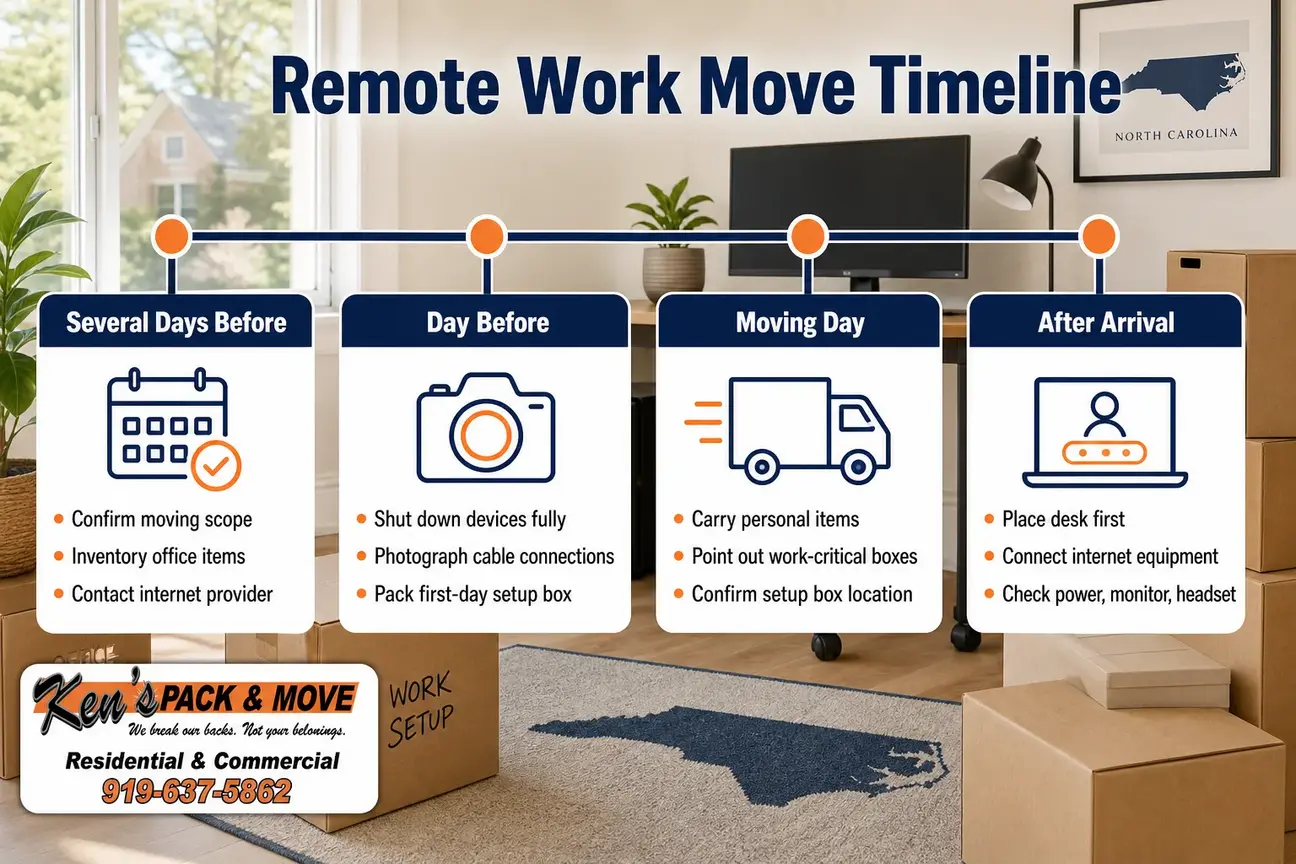
A remote work move works best when the office is planned in phases. The exact timing depends on your move date and work schedule, but the sequence below helps keep the workstation from becoming an afterthought.
Several days before the move
- Confirm the moving scope, quote details, and what will be packed by whom.
- Inventory computers, peripherals, furniture, documents, and office supplies.
- Contact the internet provider and confirm utility steps for the new address.
- Identify what you will carry personally.
- Set aside the first-day setup group.
- Ask the building, HOA, or apartment office for move-in rules in writing.
- Choose valuation before the move begins and review the mover’s written documents.
The valuation decision deserves attention. The NCUC Moving 101 guide states, “You must select your level of valuation before the move begins. Once it starts, the selection cannot be changed.” Valuation is not the same thing as your homeowners or renters insurance, and you should not assume what is included without reviewing the written paperwork. Confirm the valuation choice in writing before move day.
Several days out is also a good time to update the office move checklist with any building access rules, internet appointments, and employer instructions. If you wait until the night before, a missing elevator reservation or missing charger can become a workday problem.
The day before the move
- Shut down devices fully.
- Photograph cable connections and workstation layout.
- Label both ends of each work-critical cable.
- Pack the first-day setup box.
- Separate documents, medications, authentication devices, and valuables.
- Confirm elevator reservations, parking access, and destination readiness.
- Clear walkways around the office furniture.
This is the point where moving computer equipment should become deliberate. Avoid leaving devices running, leaving loose media in drives, or tossing adapters into a general box. If your employer owns the equipment, follow their instructions for moving, security, and reconnecting it.
Use home office packing labels that help you unpack without revealing sensitive information. “Desk supplies,” “monitor cables,” “router equipment,” and “office books” are more useful than vague labels, and they are safer than labels that name clients, accounts, or private records.
On moving day
- Keep carry-personally items with you.
- Tell the crew which boxes are work-critical.
- Point out fragile, heavy, high-value, or awkward office items.
- Keep pathways clear around desks, bookcases, and boxes.
- Confirm where the first-day setup box should go at the destination.
- Keep confidential documents and authentication devices under personal control.
Do not pack hazardous household products with office supplies without confirming whether they can be moved. Batteries, chemicals, aerosols, cleaning products, and certain plant or pest-related items may need separate handling or disposal. Ask about restricted items before move day instead of discovering a problem while the truck is being loaded.
On move day, a remote work move is easier when the office essentials are visible and separate. Tell the crew where the first-day setup box should land, but keep personally controlled documents, passwords, and access devices with you.
After arrival
- Place the desk or temporary work surface first.
- Set up one functional workstation before unpacking every accessory.
- Connect internet equipment according to provider instructions.
- Check power, monitor connections, keyboard, mouse, headset, and camera.
- Keep packing material out of walkways.
- Unpack lower-priority supplies around your work schedule.
The first login after a remote work move should be simple: power, internet, computer, monitor, input devices, and call equipment. Save décor, extra monitors, archived files, and secondary shelves for later if the workday is close.
What to send before requesting a quote
When you ask for a moving quote, send the information that affects time, access, crew planning, packing, and equipment. For a home-office move, that means more than “one desk and a few boxes.” The more accurate the details are, the easier it is to match the right scope.
- Pickup and delivery addresses
- Preferred dates and times
- Home size and property type
- Number of office rooms or workstations
- Desks, shelving, filing cabinets, printers, monitors, chairs, and heavy or awkward items
- Stairs, elevators, long carries, parking limits, and loading areas
- Fragile, high-value, oversized, or personally controlled items
- Whether you need full packing, partial packing, unpacking, furniture disassembly and reassembly, labor-only loading or unloading, or debris removal
- Building rules, access windows, COI requests, or elevator reservations
- Whether the move is short-notice
If your main concern is home office packing, say which items should be packed by the crew and which you will carry yourself. If the concern is moving computer equipment, explain the number of monitors, towers, printers, desks, and accessories, but keep data-security and backup tasks with your employer, IT provider, or personal process.
A clear quote request can also include your office move checklist as a short summary: first-day workstation, large office furniture, document boxes, fragile electronics, stairs, elevators, parking, and building rules. Keep sensitive account details out of the request.
Safety and compliance reminders for a home-office move
Moving a home office can involve sharp tools, overloaded boxes, batteries, heavy furniture, and paperwork that should not be left exposed. Keep walkways clear, avoid stacking heavy cartons where they can tip, and ask for help with awkward furniture instead of forcing a desk, bookcase, or filing cabinet through a tight turn.
For batteries and electronics, inspect items before packing and do not ignore swelling, leakage, damage, or recall concerns. For cleaning supplies, aerosols, chemicals, and other household hazardous products, ask whether they can be moved and follow the appropriate disposal guidance when they cannot. Keep work-critical electronics, chargers, and documents in controlled groups rather than scattered through the house.
Home office packing should also leave room for safe lifting and clear pathways. Do not overfill book boxes, file boxes, or electronics cartons just because the items fit. A box that is too heavy or awkward can slow the move and make placement harder at the new address.
Moving rules, building policies and prices change. Confirm scope, date, price and coverage with the mover in writing before moving day.
Final walkthrough before the office is packed
Before the last office box closes, do one final walkthrough. Open drawers, check under the desk, look behind monitors, inspect wall outlets, check the printer tray, review the file cabinet, and confirm that the router, modem, chargers, adapters, and authentication devices are in the right group. Then look at the destination plan: where the desk goes, where the router should be placed, and where the first-day setup box should land.
The fastest restart usually comes from planning the first workday before packing the last box. Moving a home office is easier when the inventory is accurate, cables are labeled, documents are protected, internet and utilities are scheduled early, and the first workstation is treated as its own priority. Whether you choose full packing, partial packing, furniture help, labor-only loading, or a complete residential move, confirm the scope in writing and keep the essentials under your control.
Frequently Asked Questions
What should I move personally when relocating a home office?
Carry documents, medications, authentication devices, sensitive removable media, valuables, work badges, and the computer or chargers you need immediately. Keep confidential materials under your control rather than placing them in an unidentified household box.
Should I pack my computer before the movers arrive?
You can prepare computers by shutting them down, removing loose media, labeling cables, and placing devices in suitable protective packaging. Ask the mover about battery-powered or restricted items before move day, and follow your employer’s or IT provider’s backup and security instructions separately.
How do I keep track of cables during a home-office move?
Label both ends of each cable, photograph the original setup, and place related cables and adapters in a labeled bag with the matching device. Keep first-day workstation cables separate from spare or miscellaneous accessories.
Can a moving company move only my home-office furniture?
A residential mover may be able to handle a limited scope such as furniture moving, disassembly and reassembly, or labor-only loading and unloading. Confirm the exact inventory, access conditions, building rules, and requested services before the move is scheduled.
How early should I schedule internet for a remote work move?
Contact your internet provider as soon as you know the destination address and move date. Ask about transfer options, equipment, installation appointments, account responsibility, and activation timing. Avoid assuming internet will be ready until the provider confirms the details for that address.
Do I need full packing or partial packing for a home office?
Choose full packing if the office is part of a larger household move and you want broad packing help. Choose partial packing if you only need help with selected office items, fragile items, books, or furniture while you personally carry documents, laptops, chargers, and access devices.
Sources
- North Carolina Utilities Commission — Moving 101, updated 2026
- North Carolina Utilities Commission — List of certificated household-goods carriers
- Pipeline and Hazardous Materials Safety Administration — Transporting Lithium Batteries, updated 2026
- City of Raleigh — Start, Stop, or Transfer Utility Services
- City of Raleigh — Right-of-Way Services