
Ken’s Pack & Move · Moving Tips
How to Move a TV Without Damaging It: Packing, Transport, and Setup
Prepare the screen, organize the parts, choose suitable packaging, and coordinate the handoff from your current home to your new one.
Knowing how to move a TV starts before anyone lifts it. A television can look manageable while still being awkward to support, difficult to turn through a doorway, or too large for the available vehicle. The display, stand, wall bracket, cables, and packaging also need different preparation. Treating them as one last-minute task creates avoidable confusion.
For households moving in Raleigh, Cary, and the Triangle, a short drive does not eliminate these challenges. The difficult part may be getting the television down a staircase, arranging appropriate packing without the original box, or discovering that the destination wall mount is not ready. A useful plan covers the entire route, including what happens after unloading.
This guide explains how to move a TV through five checkpoints: model instructions, preparation, packaging, transport, and arrival. Follow your television’s own handling and installation instructions wherever they differ from general advice. The aim is to reduce preventable damage risks and make responsibilities clear before moving day.
Quick Answer
How do you move a TV safely?
Check the model’s instructions, switch off and disconnect the TV, organize accessories, and use intact original packaging or a suitable fitted TV packing system. Arrange enough capable helpers and avoid pressure on the display. Plan upright, secured transport according to the TV and packaging instructions. At the destination, inspect the carton and television, then follow the stand, mounting, and power-on guidance before use.
Know the television
Identify the model, save the handling instructions, measure the route, and confirm who handles unmounting and preparation.
Check the complete package
Use suitable fitted packing and plan the carton’s orientation, vehicle space, handling assistance, and securing arrangement.
Prepare the destination
Inspect the television, locate its parts, and follow the model’s installation and environmental instructions.
Check Your Model Before Deciding How to Move a TV
Find the television’s exact model number and obtain its handling, packing, and installation instructions. Screen size alone does not tell you where the TV can be supported, how its stand comes off, or how many people the manufacturer specifies. An OLED television, a large LCD model, and a smaller desktop-style set may need different arrangements.
Save the relevant instructions somewhere accessible during the move. A document stored only on a computer that is already packed is less useful than a saved phone copy or printed handling page. Share the instructions with anyone helping pack or move the set, particularly when the model has unusual supports or removable components.
For example, a Sony television reference guide specifies particular handling positions, warns against stressing the panel and frame, and calls for three or more people for that large model. That is a useful reminder that “two people should be enough” is not a universal rule.
Measure the TV, the Packed Carton, and the Full Route
A television’s advertised size is generally its screen diagonal, not the width of its shipping carton. Record the actual dimensions needed for your plan: television width, height and depth, stand dimensions when relevant, and the finished carton dimensions. The package may require noticeably more clearance than the unboxed screen.
Check the route at both properties. Look at room doorways, hallway turns, stair landings, elevator openings, and the space available for turning into the destination room. Include the path between the building and the vehicle. A doorway measurement by itself does not show whether a long carton can negotiate the corner immediately beyond it.
Measure before the final packing session so there is time to change the arrangement. If the available vehicle cannot accommodate the package in its required orientation, choose a suitable alternative. Do not make the packing smaller by removing needed support simply to fit the vehicle you already have.
Send the mover clear photos and measurements when access is uncertain. A photograph of a stair turn or elevator entrance is more useful than describing it as “a little tight.” For a full household move, include the television in the inventory rather than mentioning it only when the crew arrives.
Disconnect the TV and Organize Its Components
Before disconnecting anything, take a clear photo of the existing connections if it will help with reassembly. Note which device uses each input, especially when a soundbar, game console, streaming device, or receiver is involved. This separates a moving task from a later troubleshooting task.
Switch off the equipment and disconnect power and cables according to the relevant instructions. Do not move the television with loose leads trailing behind it. If a connection is difficult to release, check the connector rather than pulling on the cable or tilting the screen into an unsupported position.
Label cords using a system that makes sense at the destination. “Living room TV — HDMI 1 — console” is more useful than an unlabeled bundle. Keep the remote, power lead, adapters, stand hardware, and setup instructions organized, with small metal parts separated so they cannot scrape the display.
Give accessories a clear destination label. If several televisions are moving, assign each a simple identifier and use it on the corresponding cable and hardware pouches. A shared bag marked “TV parts” can become confusing when the televisions use different feet, screws, or power connections.
Plan Stand Removal and Wall-Mount Work Separately
Decide who will remove the TV from its stand or bracket before moving day. A mounted television may need a specific release sequence, suitable access, and enough people to support the set while the attachment is released. Removing screws without understanding what is supporting the television can create an unstable situation.
Follow the model’s removal procedure and the packing system’s requirements. If an instruction calls for a particular preparation surface or sequence, arrange it before beginning. Do not assume the stand should remain attached because it makes the television easier to leave upright while you work.
Keep stand hardware identifiable and protected. Record where the parts belong and retain the instructions. Wall-mount hardware also deserves separate attention: the existing bracket, the new wall, and the destination installation may require compatibility checks. Moving a television and installing it on a wall are separate service scopes.
Confirm whether the mover will handle disconnection, unmounting, stand removal, packing, unpacking, or installation. Do not infer that all of these are included because the quote includes the TV. Arrange an appropriate installer when required, and avoid scheduling that work on the assumption that delivery time is guaranteed.
How to Pack a TV With or Without Its Original Box
Original packaging is useful when the carton and internal supports are complete, sound, and matched to the television. Inspect the entire system rather than assuming an old branded box is ready to reuse. Missing inserts, crushed corners, moisture damage, or a carton from a different model can undermine the fit.
Without original packaging, arrange a suitable TV packing kit or professional packing assessment. Check the actual television dimensions and the kit’s supported sizes, cushioning components, and assembly instructions. A television fitting inside the outer box does not establish that it is adequately supported inside it.
UPS’s TV packing guidance discusses using a television-specific box when the original is unavailable and controlling movement within the package. Shipping guidance does not replace your model instructions, but it reinforces the difference between fitted packing and an oversized carton filled with whatever materials are available.
| Packing option | What to verify | Decision before loading |
|---|---|---|
| Original carton and inserts | Correct model, complete supports, and sound materials | Confirm the original packing sequence can be followed |
| Replacement TV kit | Actual fit, included cushioning, and assembly instructions | Arrange the correct kit before the television is taken down |
| Professional packing | Model, size, materials, access, and agreed scope | Confirm what the packer supplies and prepares |
| Blanket only | Surface coverage does not establish fitted support | Arrange suitable packing instead of assuming coverage is enough |
Give yourself time to solve a packaging problem. If the carton arrives late or the inserts do not fit, discuss the change before loading begins. An improvised packing decision becomes harder to evaluate when everyone is waiting beside an open truck.
Your Visual Checklist
How to Move a TV: Five Checkpoints
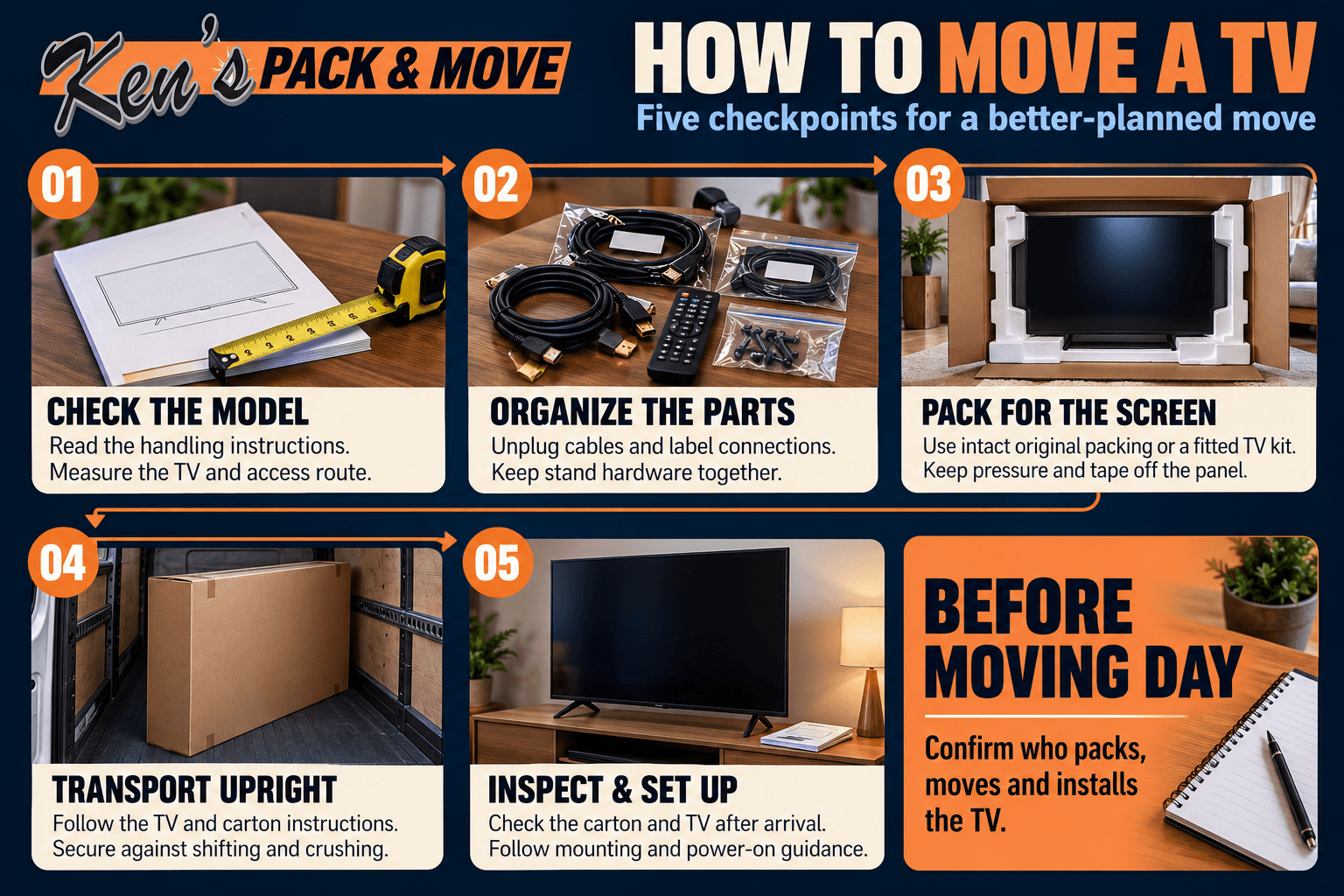
Protect the Screen Without Adding Pressure
Think about protection as a complete system: the correct contact materials, supports, outer carton, and handling arrangement must work together. Adding more material is not automatically better if it changes the fit or presses into the display. Use the materials and sequence specified for the television and packing kit.
Keep tape and adhesive labels off the screen. Avoid putting loose accessories in front of the panel or treating a padded surface as a place to rest tools. Leave enough working room to manage the carton without leaning objects against the television while you search for the next component.
Do not peel away unfamiliar layers from the display while preparing it. Sony’s protective-film guidance explains that some screen surfaces should not be removed and advises contacting support when uncertain. Packaging film and a functional screen layer are not interchangeable.
Assign one person to check that accessories, paperwork, and tools have been cleared before the carton closes. This final review is easier while the packing area is organized. Once sealed, label the package clearly enough that it will not be confused with a box suitable for stacking beneath heavy belongings.
Plan the Handling Before Moving a Large TV
Large televisions need coordinated handling, not simply a stronger grip. Check the specified support locations and number of handlers for the model. Arrange capable assistance before removing the set from its normal position. A person who is available to open doors may not also be able to support the television through a stair turn.
Clear the route before the package moves. Remove loose cords, small furniture, rugs, and obstacles from the intended path. Decide where the handlers can pause if necessary and who will open doors. Avoid beginning a carry while another person is still moving boxes out of the way.
Tell the moving company about unusually large, thin, or awkward models during the quote process. Share whether the TV is mounted, boxed, located upstairs, or accessible only through tight turns. Describe the completed package as well as the unboxed television, since packing changes the space needed for handling.
Plan Upright, Secured TV Transport
Plan vehicle space around the packed television’s required orientation. Do not assume a carton can be laid across a back seat or placed beneath other belongings because the journey is short. An LG owner’s manual, for example, directs upright transport. Follow the instructions for your specific television and packaging.
Upright positioning is only one part of the arrangement. The carton must also be secured against unwanted movement without being crushed or subjected to inappropriate restraint pressure. Other items should not be able to fall or slide into it. Have the loading arrangement assessed as part of the whole vehicle load.
Confirm who is responsible for packing and securing the television if you are hiring labor-only help or driving a rental truck yourself. Different people may handle preparation, loading, driving, and unloading. Make those handoffs explicit so nobody assumes another person has checked the final position.
Keep the destination plan in mind when choosing the loading order. If the television will be placed in a room that is not ready until furniture arrives, tell the crew. Avoid unloading a large fragile carton into a busy entryway where it must be moved again repeatedly.
Can you lay a TV flat for a short move?
Do not use a short journey as the reason to disregard handling instructions. Arrange a vehicle and packing system that accommodate the required orientation. If the available space does not work, change the transport plan rather than improvising around the screen.
Coordinate TV Moving in Raleigh and Cary
Local TV-moving plans should account for the actual properties. A Raleigh apartment may involve an elevator and controlled loading access; a Cary townhome may require several interior turns. The practical question is whether the packed television can follow the approved route with the agreed handlers and equipment.
If the building has an elevator reservation or restricted move window, complete the TV’s preparation before that window begins unless packing is part of the scheduled service. Waiting for a missing box or an unmounting appointment can consume time intended for loading. Share unfinished preparation with the mover before confirming the schedule.
Use Ken’s Raleigh apartment move checklist for building permissions, elevator arrangements, and loading access. Keep this guide focused on the television itself: model instructions, packing, handling, transport, and arrival. Both plans need to be ready for a coordinated move.
If rain affects the route, discuss covered access and handling with the crew. Stage the package indoors until the agreed transfer is ready. Do not leave the television waiting outside while the household clears vehicle space or looks for destination keys.
Confirm Who Packs, Moves, and Installs the TV
A complete TV-moving plan names the person or provider responsible for each task. Packing assistance does not automatically include electrical work, wall-bracket installation, cable concealment, or equipment configuration. Ask about the exact work you need, then confirm the agreed scope and materials before moving day.
| Task | Confirm in advance | Ready-to-proceed check |
|---|---|---|
| Disconnection | Who labels and disconnects equipment | Cables are clear and accessories identified |
| Unmounting or stand removal | Who handles the model-specific procedure | Required assistance and instructions are available |
| Packing | Who supplies and assembles the packing system | Correct materials are present before preparation starts |
| Loading and transport | Who handles vehicle space and securing | Package dimensions and orientation fit the plan |
| Delivery and unpacking | Where the carton goes and who opens it | A suitable destination area is clear |
| Installation | Whether a separate installer is needed | Stand or mounting requirements have been checked |
For help choosing the scope of assistance, see Ken’s guide to professional packing services in Raleigh. Include the television’s model, size, current mounting arrangement, packaging status, and both access routes in your request.
If the plan changes, communicate the change before the move proceeds. Replacing a smaller television with a much larger screen, discovering missing packaging, or adding unmounting work may affect preparation. A revised conversation is more useful than expecting the original arrangement to cover details the mover has not seen.
Inspect the Television Before Setup
Decide where the television will wait after delivery. Clear a suitable indoor area before the carton arrives, away from active furniture placement and unpacking traffic. If installation is scheduled later, keep the packing organized and avoid opening the carton simply to lean the television against an unfinished setup.
Check the outside of the carton and document visible concerns before discarding materials. When unpacking, follow the packing system’s opening sequence and use the assistance required for the model. Keep the stand hardware, remote, and cables together as each component is located.
Inspect the television before connecting it. If you notice damage or an unexpected condition, pause and contact the appropriate mover, manufacturer, or service provider. Retain relevant packaging and photographs while the concern is assessed. A condition record helps explain what was observed without guessing when or how it happened.
Follow the model’s installation, environmental, and power-on instructions. There is no single waiting period suitable for every TV after every move. If the set experienced a substantial temperature change or you suspect moisture, ask the manufacturer about the appropriate next step rather than applying a universal internet rule.
Place the television only on a suitable stand or correctly installed compatible mount. Keep children and pets away from the setup area until the arrangement is stable and the relevant tip-over precautions are complete. Reconnect components methodically so a missing input setting is not confused with a moving-related problem.
Common TV-Moving Mistakes to Avoid
Buying a box by screen diagonal alone
Check actual dimensions and the kit’s compatibility requirements. The television, stand arrangement, protective inserts, and carton must fit together as intended. An outer box that closes is not the only measure of suitable packing.
Leaving unmounting until the crew arrives
Confirm who will do the work and whether it is included. A missing release tool, unclear bracket procedure, or unavailable helper can delay packing and affect the rest of the move.
Choosing a vehicle before checking the carton
Measure the finished package and verify the required orientation. Avoid discovering at departure that the chosen vehicle only accommodates the television when positioned against its handling instructions.
Treating delivery as completed installation
Plan unpacking, stand assembly, mounting, and connection separately. Confirm the destination arrangement before opening the carton so the television does not need to be moved repeatedly while you organize the room.
Keep the Handoffs Clear
Your Final TV Moving Checklist
Before Packing
- Save the model number and handling instructions.
- Record television and finished-package dimensions.
- Check the route, vehicle space, and destination.
- Confirm preparation and packing responsibilities.
- Organize cables, hardware, remote, and instructions.
Before Loading
- Check that the packing system is complete and closed.
- Keep loose accessories away from the display.
- Clear the route and arrange appropriate assistance.
- Agree on orientation and vehicle securing.
- Confirm the delivery room and unpacking plan.
After Arrival
- Inspect and document visible concerns.
- Locate stand parts, hardware, remote, and cables.
- Follow unpacking and setup instructions.
- Confirm stand or mount suitability.
- Follow manufacturer guidance before power-on.
Plan Before Moving Day
Need Help Moving a TV in Raleigh or Cary?
Tell Ken’s Pack & Move about the television’s size, model, packaging, mounting arrangement, and access at both addresses. Discuss packing and moving responsibilities before the schedule is confirmed so the plan reflects the actual television and route.
Planning a larger household move? Explore Ken’s local moving services and share the complete inventory with your request.
Clear Answers Before You Move
Frequently Asked Questions About How to Move a TV
How do you move a TV without its original box?
Arrange a suitable fitted TV packing kit or professional packing assessment. Check the actual television dimensions, the kit’s compatibility, its cushioning components, and the model’s instructions. Do not assume that a blanket or a generic oversized carton provides the same support as an appropriate packing system.
Can I lay a flat-screen TV down in my car?
Plan transport according to the television and packaging instructions, which commonly call for upright positioning. Do not disregard those instructions because the journey is short. If the packed television cannot fit in the required orientation, arrange a more suitable vehicle rather than changing the handling plan to fit the available space.
Is wrapping a TV in a moving blanket enough?
A blanket may provide surface coverage, but it does not establish that the television has suitable internal support, a rigid outer carton, or protection from shifting and crushing. Follow the model’s instructions and arrange a packing system appropriate for the television and the planned move.
Should I remove the TV stand before moving?
Follow the television’s removal procedure and the packing system’s requirements. Decide who will support the set and remove the stand before beginning. Keep the hardware identified and protected. Do not assume the stand should remain attached simply because it helps the television stand upright during preparation.
Can one person move a large TV?
Check the manufacturer’s required assistance and handling positions for the exact model. Large televisions may require multiple people, and the needed arrangement also depends on the route and packaging. Do not use screen weight alone to decide whether one person can manage an awkward or delicate set.
Will movers remove and reinstall a wall-mounted TV?
Confirm the exact service scope before booking. Moving, packing, unmounting, wall-bracket installation, and equipment setup are separate tasks and should not be assumed to be included together. Share the model and mounting details, and arrange an appropriate installer when the work requires one.
How long should I wait before turning on a TV after moving?
Follow the manufacturer’s environmental and power-on instructions. There is no universal waiting period for every television and moving condition. If the set experienced a substantial temperature change or you suspect moisture, contact the manufacturer before connecting power rather than relying on a fixed waiting time found online.
What information should I send when requesting TV moving help?
Provide the model, screen size, actual dimensions, current mounting arrangement, packaging status, pickup and destination addresses, and access details. Include stairs, tight turns, elevators, and the intended destination room. Explain whether you need packing, unmounting, transport, unpacking, or separate installation assistance.

Moving Preparation & Coordination
Reviewed by Ken’s Pack & Move Staff
Questions about the moving plan? Share your television’s model, packing needs, and access details with the Ken’s Pack & Move team. Confirm the scope of packing and handling assistance before moving day.
Your television manufacturer’s instructions guide model-specific handling, installation, and power-on decisions.